The Ultimate Travel Hack: Why Every iPhone User Needs This Portable SD Card Reader
In an era of high-definition photography and 4K video, our iPhone storage often struggles to keep up. Whether you’re a professional photographer, a trail camera enthusiast, or a traveler capturing memories on the go, the struggle of transferring files without a laptop is real.
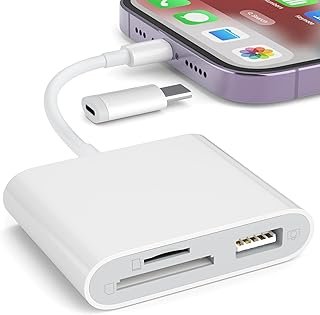
Enter the Plug-and-Play SD Card Reader for iPhone & iPad—the compact solution to all your storage and transfer woes. Here is why this tiny gadget is a must-have for your tech bag.
1. Instant Content Sharing (No App Required!)
The biggest headache with most iPhone accessories is the need for third-party apps. This SD Card Reader is truly Plug-and-Play. Simply plug it into your Lightning port, and your device’s native “Files” or “Photos” app will recognize it instantly. No downloads, no subscriptions, and no complicated setups.
2. Dual Slot Versatility: SD & TF/MicroSD
Why carry multiple adapters? This reader features a dual-slot design that supports:
Standard SD Cards: For your DSLRs and mirrorless cameras.
TF/MicroSD Cards: For your GoPros, drones, and Android devices.
USB Camera Adapter: Allows you to connect your camera directly via USB cable or even plug in a keyboard/MIDI device.
3. The Best Friend of Hunters and Nature Lovers
If you use Trail Game Cameras, this device is a game-changer. Instead of taking the camera down or waiting until you get home, you can view your wildlife footage directly in the woods. Just pop the card into the reader, plug it into your iPhone, and see your photos in high resolution immediately.
4. Lightning Fast Transfer Speeds
Stop relying on slow, battery-draining Wi-Fi transfers. A physical connection via this adapter ensures:
Stable data transmission for large video files.
Two-way transfer: You can move photos from the card to your phone, or back up your phone’s photos to the card to free up space.
5. Travel-Ready & Ultra-Portable
Designed with portability in mind, this adapter is small enough to fit in your pocket or a tiny pouch in your camera bag. It’s the perfect companion for long flights, allowing you to edit your professional photos on your iPad while you’re still in the air.
How to Use It:
Insert your SD or MicroSD card into the reader.
Connect the adapter to your iPhone or iPad.
Open the “Photos” app (for images) or the “Files” app (for all document types).
Select the files you want to import and hit “Save.”
The Verdict
The SD Card Reader for iPhone is more than just a convenience; it’s an essential tool for anyone who takes their content creation or hobbies seriously. It saves time, saves battery, and most importantly, it saves you from the “Storage Full” notification.